Hopp til innhold

Norsk nettbutikk | Rask levering | Frakt i hele Norge

Expression

 
Old Blood Noise Expression ...

2.674,-

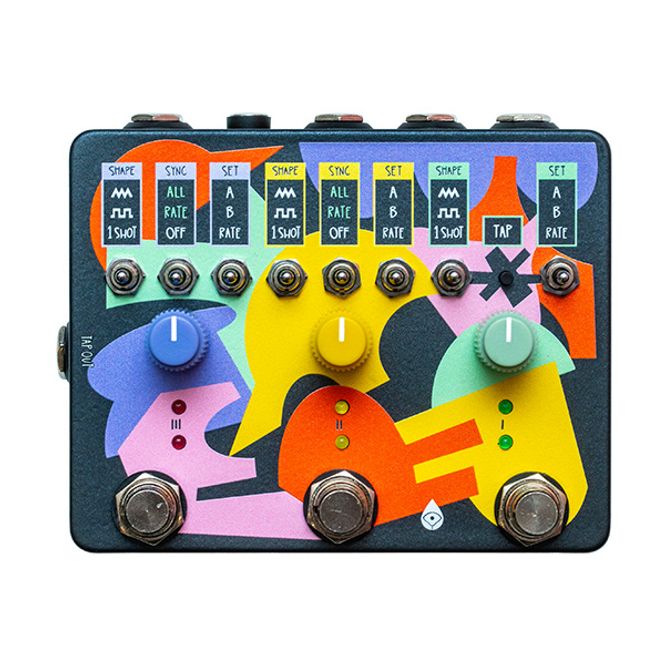
Old Blood Noise Endeavors Expression Ramper X3 Syncable Triple Expression Control with Presets Expanding on the concept of our Expression Ramper, we present the Expression Ramper X3, an expression movement shaper capable of manipulating three expression jacks simultaneously with copious control. This utility device brings new sounds out of your old favorites, reinvigorating the sonic possibilities of your collection. Main Features: • Expression Control Pedal, with storable expression preset settings • 3 expression separately adjustable and syncable outputs to create footswitch activated motion on up to three external devices • Ramp between the two presets (A and B) • 3 new random shapes (Smooth, Sharp and 1 Shot) in addition to the classic shapes (Triangle, Square, and 1 Shot) for movement between settings • Ability to sync across all three Rampers, with subdivided rate or direct output matching • Tempo syncing via tap switch on the device, external tap switch, and tap out in order to sync multiple Expression Ramper X3s • Expression input for Ramper 1, allowing X3 to become a 1-in-3-out Expression splitter • Rate control, sets the speed of movement • Configurable EXP output (TRS, TRS reverse polarity or TS) • LED indicates which setting is currently active • Smart footswitching for momentary or latching operation • Powered by regular 9 V DC PSU (centre -, 2.1 mm, ~50 mA current draw) A Ramper is a device that creates motion on your expression-enabled devices. You choose point A, point B, and the way it moves between. It’s utilitarian, but opens up a number of sounds from your existing pedals. The Expression Ramper X3’s allows you to set the shape of the LFO (the thing that determines the expression motion). There are three standard shapes (Triangle, Square and One Shot), and three random variations of those shapes. To access the alternative shapes, simply hold down the tap button while switching the Shape toggle. • Triangle, for a linear motion between A and B, starting and ending at A and hitting B at halfway on the LFO cycle. • Alternate shape: Smooth random, which repeatedly moves to a random spot between A and B in a linear fashion. • Square, to snap between A and B, spending half of the LFO cycle in each position. • Alternate shape: Sharp random, which immediately moves to a new random spot between A and B at the start of each cycle. • 1 SHOT, to move linearly either from A to B or B to A (depending on the starting point) and then stop. • Alternate shape: one shot random, where each press of the footswitch snaps to a new random spot between A and B. The device’s Footswitches set things in motion. A stomp of the footswitches will initiate motion according to the shape and LFO speed you’ve set, and another stomp will stop that motion. By holding a footswitch, you can momentarily stop or start the movement, and then revert to where you were before when that footswitch is let go. Most of the time, when not in motion, a Ramper will be in the A position, unless using one of the 1 Shot modes or currently setting the B position. To know where your Ramper is, use your ears as an auditory guide and the two LEDs as a visual guide. Expression Ramper X3 is more than three Rampers in one box, there are a plethora of additional controls to tempo sync multiple Rampers. The SYNC toggles on Rampers II and III determine whether they are synced to Ramper I. ALL syncs everything about the Ramper: the output of the completely synced Ramper will match Ramper I’s output exactly. RATE syncs only the rate of the Ramper: A, B, Shape, and motion settings stay independent, but the rate is tempo synced. In this setting, changing the Rate knob assigns subdivisions: 1⁄4, 1⁄2, 1x, 2x, 3x, and 4x speeds are all available. OFF deactivates any syncing, so the Ramper can act fully independently. Ramper I (the green one) has a TAP button. This can be used to tap in the desired LFO speed. It begins syncing at two taps, but multiple taps in a row at similar BPMs will average out to increase accuracy. Note: the slowest possible tap tempo is 30 BPM, so taps outside of this range will be disregarded. Ramper I also has external control via the jack. It can be used in three different ways, configurable via the internal dipswitch (located on the bottom right of the board, labeled “TAP/EXP SETTING”). It can be configured for TRS Expression input, External Tap Tempo with a footswitch, like our ‘Scooch’ Tap Tempo device using a TS cable and tap away. Or for External Tap Tempo using a pulse, turn 1 off, 2 off, 3 off. This is optimized to sync tempo across two ERX3s by plugging into the second ERX3's Tap Out jack, but will also work with other external pulse sources. There is also a TAP OUT jack on the side of Triple Ramper. This continually outputs 3.3V pulses based on Ramper 1’s tempo. In this way, you can sync external units (like another Expression Ramper X3) to Ramper 1. Happy Ramping!
Old Blood Noise MTET MIDI To ...

1.667,-

Old Blood Noise Endeavors MTET MIDI to Expression Translator Realizing matching gaps in the market and their friends’ workflows, Old Blood Noise Endeavors unveils their newest utility device, the MIDI to Expression Translator (MTET). MTET is a simple device for complex workflows.  It receives MIDI CC messages and turns them into expression outputs, allowing players to unlock MIDI control over their expression-enabled devices.  Where once there was only a foot, now there is envelope control, LFO control, snapping to preset positions: any MIDI shape can express an OBNE (or similar) device. Main Features: • MIDI to TRS Expression interface • Translates MIDI control change messages to TRS Expression • 4 individual expression outputs • Expression compatibility with any TRS expression enabled device where tip is connected to wiper • CC control over LSB for 8-bit resolution from a 50K digital potentiometer • MIDI Thru jack for easy daisy chaining • Powered by (opt) regular 9 V DC PSU  (centre -, 2.1 mm, 50 mA current draw) Language is hard: let’s start at the start. Communication is complex, beautiful a real thorn in our sides. Many languages, dialects, standards.  Some similar, some vastly different. A linear sweep, a barrage of Bits. Music, of course, is meant to be the universal language, but our devices don’t see it that way. One could argue even we don’t see it that way – tonal and microtonal, EAST+WEST, free jazz and bubblegum pop. But we’re not here to argue. We’re here to blame the devices. The MIDI To Expression Translator (MTET) does exactly what it says on the tin. It receives MIDI messages from external MIDI devices and uses those MIDI messages to create four separate Expression outputs for use with external expression enabled devices. MTET uses a 50k digital pot, wired for TRS connection with the tip active (connected to the wiper). It is assumed the external expression-enabled unit will apply to the sleeve and reference voltage to the ring. It is configured to communicate with other devices using this standard. Its primary purpose is to interface with Old Blood Noise Endeavors pedals and serve as a communicator between them and a MIDI controller. However, it will work with many other units that use the same expression setup as OBNE.
  • vipps-orange.png
  • klarna-light.png
  • mastercard-full.png
  • visa.png