Hopp til innhold

Norsk nettbutikk | Rask levering | Frakt i hele Norge

Nye produkter

Fender Studio AudioBox GO

860,-

2x2 USB-C audio interface. 24-bit/96 kHz. 1 XMAX-L mic preamp. 2 TRS and 1 headphone out. Compatibility with Fender Studio mobile app ​and Fender Studio Pro​. Simultaneous I/O: 2x2 Mic Preamps: 1 XMAX-L A/D Resolution: 24-bit/96 kHz Connectivity: USB 2.0 Type C (Bus-powered) Digital Connections: No MIDI: No Compatibility: Mac, Win, iOS, Android Dimensions: 110 x 85 x 44 mm Weight: 0,375 kg The Fender AudioBox Go is a portable, high-performance 2 x 2 USB-C audio interface designed for creators who need professional-quality recording anywhere. Its XLR mic/line combo input with switchable +48V phantom power handles vocal and instrument recording with clarity, while the dedicated TS instrument input delivers plug-and-play tone for guitars, basses, and line-level sources. Professional 24-bit / 96 kHz converters and low-noise preamps ensure every recording is crisp and detailed. The ¼-inch stereo headphone output and balanced TRS main outputs give you flexible monitoring options, while the Mix control lets you dial in low-latency, real-time tracking for precise performance. Bus-powered and ultra-portable, the AudioBox Go integrates seamlessly into home studios, desktop setups, or mobile rigs. Compatible with Fender Studio, Fender Studio Pro, and most other audio apps, it’s ready for recording, mixing, and producing music or podcasts right out of the box. PERFECT MOBILE INTERFACE Ultra-compact, bus-powered design makes recording anywhere simple — from desktops to on-the-go setups — without sacrificing flexibility or performance. STUDIO-QUALITY AUDIO 24-bit/96 kHz converters, low-noise mic preamp, dedicated instrument input, and balanced outputs deliver clean, professional-grade recordings for music, podcasts, and content creation. EXTREMELY LOW-LATENCY MONITORING Dial in the perfect balance of your direct input signal and computer playback with the built-in Mix control, ensuring accurate real-time monitoring while tracking. SOFTWARE INCLUDED Start producing right away with Fender Studio Pro. Record, mix, master, and perform in a professional DAW with intuitive drag-and-drop workflow, creative tools, and authentic Fender amps and effects. FEATURES - Ultra-compact 2x2 USB-C audio interface with 24-bit/96 kHz resolution - One XLR mic/line combo input with switchable +48V phantom power - One dedicated TS instrument input for guitar or bass - A ¼-inch stereo headphone output with zero-latency monitoring - Two balanced ¼-inch TRS main outputs for studio monitors or powered speakers - Bus-powered, portable design for home or mobile recording setups - Compatible with Fender Studio, Fender Studio Pro, and most other audio apps - Free 6-month trial of Fender Studio Pro — a full-featured DAW with intuitive workflow, creative tools, and authentic Fender amps and effects.
Universal Audio VOLT 876 ...

12.495,-

Universal Audio Volt 876 USB-2.0 Audio Interface (MAC/WIN) 24 inn / 28 ut USB-lydkort med åtte preamper og banebrytende 32-bit / 192 kHz lydkonvertering. Vintage Mic Preamp-modus på hver kanal for å ta opp stemmen, gitaren, synth-ene eller bandet ditt med den fyldige, rike lyden fra en ikonisk UA 610 rørpreamp. UA 76 kompressorer på hver kanal for å gi klarhet og punch til vokal, trommer, instrumenter og andre kilder, med analog krets basert på den anerkjente 1176. Legendarisk Analog Lyd for Hele Bandet Volt 876 USB Recording Studio er bygget av det samme teamet som står bak det legendariske Apollo, og gir seriøse musikkprodusenter et neste-generasjons 32-bit / 192 kHz lydgrensesnitt med åtte innebygde Vintage preamper og klassiske kompressorer i 1176-stil rett på frontpanelet. Dette sikrer stor, analog studiolyd til enhver mikrofon og ethvert instrument du kobler til. Volt 876s integrerte opptaksopplevelse inkluderer full gjenkalling av grensesnittinnstillingene, mulighet for opptak på mobil (iPhone eller iPad), ikoniske UAD plug-ins og instrumenter, og LUNA Digital Audio Workstation med smarte AI-drevne opptaksverktøy. Detaljer 24 inn / 28 ut USB-lydgrensesnitt med åtte preamper og banebrytende 32-bit / 192 kHz lydkonvertering. Vintage Mic Preamp-modus på hver kanal for å ta opp stemmen, gitaren, synth-ene eller bandet ditt med den fyldige, rike lyden fra en ikonisk UA 610 rørpreamp. UA 76 kompressorer på hver kanal for å gi klarhet og punch til vokal, trommer, instrumenter og andre kilder, med analog krets basert på den anerkjente 1176. Digitalt-kontrollerte mikrofonpreamper med Assistert Auto-Gain og full gjenkalling av sesjonsinnstillinger med UAD Console-appen og LUNA Digital Audio Workstation. 16 inn / 16 ut ADAT-tilkobling for digital utvidelse og kobling av opptil tre Volt 876-grensesnitt for å danne det ultimate 24 x 28 opptakssystemet. Frittstående ADAT-modus for å koble Volt 876 til tredjeparts grensesnitt eller Apollo via ADAT som en 8 x 8 I/O preamp-utvider. Innebygd talkback-mikrofon for enkel kommunikasjon i studioet. Direkte monitorering i sanntid med dedikerte kontroller på frontpanelet, pluss to stereo lav-latens medhøringsmikser (cue mixes) ved bruk med UAD Console eller LUNA DAW. Klassekompatibel for problemfri oppsett med Mac, iPad og iPhone. Windows-systemer krever ASIO-driveren, tilgjengelig i UA Connect-appen. To hodetelefonforsterkere av studiokvalitet for høy, klar monitorering og enkelt samarbeid. 48V fantomspenning for kondensatormikrofoner (kan velges per kanal). Stilig, robust konstruksjon bygget for å tåle mange års bruk, med inkluderte rackører og gummiføtter for alternativer for skrivebords- eller 1U-rackmontering. Hva er inkludert Inkludert programvare for Mac og PC LUNA Digital Audio Workstation UAD Producer Suite: Teletronix LA-2A Tube Compressor (Rørkompressor) UA 1176 Classic FET Compressor (Klassisk FET-kompressor) Pultec Passive EQ Collection (Passiv EQ-samling) Century Tube Channel Strip (Rørkanalstripe) Oxide Tape Recorder (Båndopptaker) Verve Analog Machines Essentials (Analogmaskiner – essensielt) Pure Plate Reverb (Plateklang) Galaxy Tape Echo (Båndekko) PolyMAX Synth Showtime ‘64 Tube Amp (Rørforsterker) Inkludert tredjeparts programvare (med forbehold om endringer): Ableton Live Lite Melodyne Essential av Celemony Ampeg® SVT-VR Classic Bass Bundle av Plugin Alliance Marshall® Plexi Classic Amp Bundle av Softube Virtual Drummer DEEP av UJAM (Virtuell trommeslager) Virtual Bassist DANDY av UJAM (Virtuell bassist) LABS av Spitfire Audio
PreSonus Notion 6

1.480,-

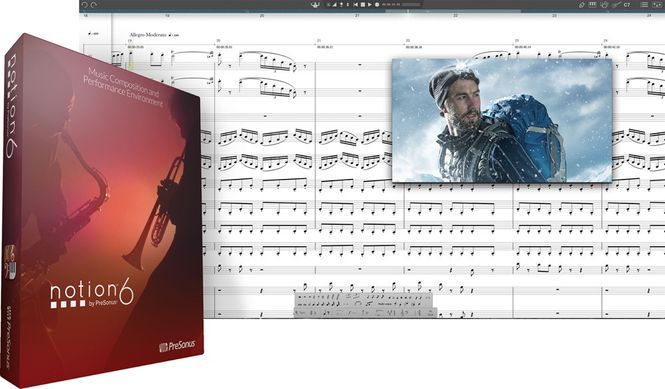
Bring musical inspirations to life with the blazingly fast and intuitive Notion 6 music composition and performance environment. For Mac and Win. Perpetual license. Download. Redefining music notation. Bring musical inspirations to life with the blazingly fast and intuitive Notion® 6 music composition and performance environment. Compose when and how you want and even enter music with your own handwriting. Take projects to the next level thanks to deep integration with Studio One Pro. Hear and perform music with gorgeous samples by the London Symphony Orchestra and others. Deliver polished scores faster than ever before, from complete film orchestrations to simple lead sheets and guitar tab. Whether you are an instrumentalist, songwriter, composer, arranger, music educator, or student, you’ll find Notion 6 to be the easiest-to-use and best-sounding notation software on the market today. Notion 6: Redefining music notation. New in Notion 6. The new features and enhancements in Notion 6 represent the most popular requests from the Notion user community and feedback from users of other notation platforms who are looking to make the switch. Notable improvements include: cross-platform handwriting recognition; new layout control and features for professional score output; drag to respace measures and systems; new instruments from Soundiron; new video window controls for faster scoring to picture; the new Notion Scores library, with over 100 great works; updated Music XML support for seamless transfer with other apps; MP3 export; and unprecedented side-by-side workflow integration with Studio One Pro on the same computer or between multiple computers on the same network. Hear your music played by world-class musicians. Notion gives you by far the best playback of any notation product, including the unmatched realism of orchestral and Steinway samples recorded by the London Symphony Orchestra at the legendary Abbey Road Studios, guitar samples performed by Neil Zaza, bass samples by Victor Wooten, and drum samples by Roy "Futureman" Wooten. All were painstakingly recorded by top engineers using the best equipment. You get a wide array of dynamics, articulations, and performance techniques. New instruments in version 6 include the Notion Harpsichord along with the Lakeside Pipe Organ and Olympus Micro Choir sounds from our friends at Soundiron. But that’s just the beginning of Notion’s playback features. Your music, in the studio or on the go. Create a score in Notion for macOS or Windows; then continue to work on it with Notion Mobile, on your Chromebook or iPad®. Or capture inspiration on the fly with your iPhone® and transfer to your computer for in-depth editing. No other notation software can do this. With Notion and Notion Mobile you can seamlessly create, send, and open scores between Mac, Windows, Android and iOS devices and continue to work on your score, anywhere, anytime! No matter which platform you use, you get the high-quality playback sounds for which Notion is famous. Plus Notion 6 is a native 64-bit application on all platforms, so you get fast, efficient, and stable performance too. Interactive tools make entry fast and intuitive. Enter notes with ease using Notion 6’s interactive fretboard, keyboard, and drum pad. It’s the fastest and most convenient way to capture pitches, drum parts, and guitar fingerings. You can even customize the number of guitar strings on the fretboard and the order of entry for each voice for the drum pad. Lyrics can be entered directly or pasted from any digital source. Want to get your hands on your score? Notion 6’s new Powered by MyScript™ handwriting-recognition feature lets you write directly into the score, automatically converting your input into digital notation. Choose chords from a generous chord library and create your own chords. It’s simple to enter the chord name or voicing you want to appear in your score. Choose from standard chord symbols and fretted chord symbols and design custom chord symbols and diagrams. Chords remain on the fretboard for repeated entry, and the software can recall recently used chords. Chord symbols can be attached anywhere over empty measures, meaning lead sheets can be created in no time! Capture MIDI parts and edit them with your score. Recording MIDI performances and editing MIDI data is easy in Notion. Viewing MIDI and standard notation together makes the experience unique and intuitive. Choose keyboard, guitar, or drum entry and dial in exactly how Notion will follow your playing. Enter in real time or in step time, then view your MIDI performance data in Notion’s Sequencer Staff. Better yet, use the Sequencer Overlay, which allows you to see notation and MIDI performance data on the same staff. Using drag-and-drop, edit each individual note’s velocity, duration, start point, and end point. For precise values, double-click each note and customize the note’s numeric values directly. Notion combines the power of MIDI sequencing with the clarity of standard notation in a unique and powerful way. If you compose to picture, Notion 6 is your new best friend. Film, video, and TV composers have specialized needs that just start with a synchronized video window. Notion’s video window includes a timecode view, and you can add hit points and select the volume, frame rate, and start time. Transport buttons let you control your score from the video window with fine frame control. Unlike other scoring software, Notion can handle all of the most important modern video file formats, including MP4, WMV (Windows only), H.264, MPEG, MOV, AVI, M4V, and 4GP on macOS and Windows. Don’t just play your music: perform it, too. Notion lets you play back a score following metronome marks, but you can also perform your scores live, continuously controlling tempo and velocity. Jump in and out of repeats, vamp measures, fade in and out, and navigate live from your computer keyboard or a MIDI controller. To top it off, Notion 6 comes with the Notion Score Library with over 200 files to explore. Powerful mix engine by the folks who defined digital mixing. PreSonus changed live sound with our StudioLive digital mixers. We turned the production world on its ears with our Studio One Pro digital audio workstation. While you might not expect advanced mixing capabilities to appear in ordinary notation software, Notion 6 is far from ordinary. Get truly professional mixes with up to eight stereo buses through the built-in software mixer. Import an audio file to mix with your score or to transcribe from. Process your sounds through eight effects inserts with reverb, guitar-amp simulator, and EQ, compressor, and limiter plug-ins drawn from PreSonus’ Studio One Pro DAW. You can also use your favorite VSTs. Yes, Notion is a professional notation program—but it's clearly much more! Deliver professional scores and polished performances. While many Notion layout and notation choices are made automatically so you can focus on creating music, sometimes you need to fine-tune your score’s appearance for easy reading and a professional look. Notion 6 provides new layout handles that let you drag notes, measure lines, time signatures, and more, while avoiding accidental respacing. Show and hide parts independently by system and show/hide resting staves for minimal wasted space and maximum readability. Even drag entire systems up and down on the page to adjust the spacing; when you let go, Notion rejustifies the layout. When it's time to deliver, Notion has you covered. Print stunning scores and export PDFs. Export standard MIDI files or MusicXML files for collaborating with people using other notation applications. And deliver fully mixed WAV files or MP3s of your entire performance or individual parts. Serious studio integration. While Notion exceeds all other notation software with its mix capabilities, you can take compositions to the next level by pairing Notion 6 with Studio One Pro, where you can now send audio, note, track, VST and score data directly between the applications. The workflow between Notion 6 and Studio One Pro is unprecedented, as both applications can run side by side on the same computer or on any computers on the same network. The complete composer's toolkit. In addition to individual and educational licensing options, Notion is also available as part of Studio One Pro+, the ultimate toolkit for the modern composer. From simple lead sheets to complete orchestrations, you’ll deliver polished scores fast with award-winning Notion software. Deep integration with Studio One Pro lets you start your score in Studio One Pro and send it to Notion and vice versa. Use Studio One Pro’s Sound Variations to easily set up and control complex orchestral libraries. No matter how you compose, Studio One Pro+ has you covered. Studio One Pro+ membership benefits include licenses for both Notion and Studio One Pro, plus every Notion Add-on Sound Expansion pack, PreSonus Symphony Orchestra and Studio Grand for Studio One Pro, and so much more. On top of these creative tools, Studio One Pro+ members are also given Cloud collaboration tools and 100 GB storage, a library of exclusive master classes and live streams, with much more added continuously—all for a low monthly or annual membership. FEATURES Traditional Notation or Tablature – Fast and Easy - Easily compose, play back, and edit music - Perform scores using Notion as a live instrument and save your performance - Create a score on a Mac or a Windows computer or tablet and continue to edit on a tablet or phone with Notion Mobile and vice versa
Interactive entry tools: Keyboard, Fretboard, Drum Pad, Chord Library (including custom chords) - Cross-platform handwriting recognition, powered by MyScript™ for written entry - Sequencer overlay to see notation and MIDI data on the same staff - Windows touchscreen support—just use your finger or stylus and tap - Work with Notion in your native language with options for Simplified Chinese, English, French, German, Italian, Japanese, Korean, Portuguese, and Spanish Create and Perform with Unmatched Sound Quality - Best playback of any notation product, with samples recorded by the London Symphony Orchestra, Roy and Victor Wooten, Neil Zaza, Soundiron, and others - Full guitar and bass articulations in playback - Custom rules editor for instrument-specific articulations - Increase your sonic palette with additional expansion sounds from PreSonus® or your favorite VST instruments and libraries - Process audio with included PreSonus Native Effects Limiter, Compressor, and Pro EQ plug-ins or other VST plug-ins - Mix with a DAW-style console with up to eight individual buses - Live-performance options include play, tap, vamp, repeat, fade, playback dynamics, and navigate with Heads Up Display Serious Studio Integration - Transfer audio and note data between Notion and Studio One Pro anywhere on your network - Set music to film with advanced video capabilities - Compose to picture with the video window - Import video in a variety of formats: MP4, H.264, MPEG, MOV, AVI, M4V, and 3GP on Mac and Windows, plus WMV on Windows - Native 64-bit support - Retina (Mac) and High-DPI (Windows) support for high-resolution displays Deliver Professional Scores and Polished Performances - Print entire scores, individual parts, or lead sheets with chords and lyrics - Layout control tools: drag notes, measure lines, time signatures, and more, while avoiding accidental respacing - Show/hide parts independently by system for maximum readability - Import/export files to/from Finale® and Sibelius® via MusicXML or other apps via Standard MIDI Files - Export scores as PDF files - Export WAV or MP3 audio files - One-click Bounce All export of individual staves or mixed buses
Fender Studio Pro 8 Upgrade

970,-

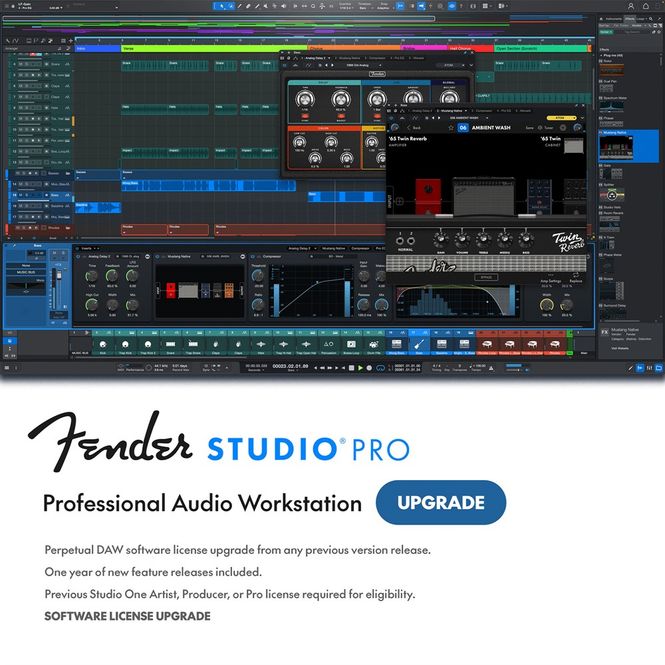
Studio Pro 8 is the ultimate music production software for recording, producing, mixing, mastering, and performing. For Mac, Win & Linux. Upgrade from all previous versions of Studio One Artist, Producer or Professional. Perpetual license. Download. MEET FENDER STUDIO PRO The next evolution of modern music creation. Built on PreSonus’ award-winning Studio One platform, Fender Studio Pro combines its celebrated features and trusted performance with a modernized interface, Fender’s renowned amps and effects models, and intuitive new workflows that make creating music faster, more inspiring, and more connected than ever. Creativity Amplified Fender sounds right in the box — delivering classic tones, pro presets, and powerful FX inside a modern digital audio workstation built for creators. Fender Studio Pro is ultimate DAW for music makers and modern creators of all kinds — whether you’re recording guitar, producing beats, tracking vocals, or shaping full mixes with zero limits. With dozens of guitar and bass amps, 9 virtual instruments, over 70 FX pedals, 45 native fx, and hundreds of presets, it’s everything you need for professional studio recording, home recording, music production and beat-making. Experience seamless audio recording software and fully cross-platform music production that grows with your creativity. Fender Studio Pro delivers the tools, tones, and technology that empower every artist to create without limits. PLUG IN TO TRUE FENDER TONE. Fender Mustang Native Guitar and Rumble Native Bass plugins put classic Fender amp tone right inside your session. Get instant access to 39 guitar amps and 18 bass amps, complete with pro presets that dial in iconic sound fast. Take your tone even further with 125 FX pedals and hundreds of ready-to-go presets. From must-have stompboxes to deep creative processing, you get a full arsenal of effects designed to shape, polish, and inspire every track. POWERFUL TOOLS. FASTER WORKFLOWS. - Channel Overview Access every key parameter of a mixer channel in a single view. Adjust insert effects, native or third-party plug-ins, and custom views quickly without opening multiple editors, directly from the Transport Bar or a track double-click. - Arrangement Overview Get a complete bird’s-eye view of your session. Navigate all tracks and the full length of your arrangement with zoom, pan, and highlight tools — making even large projects feel effortless and intuitive. - Chord Assistant Next-chord recommendations based on your current progressions. Explore creative harmonies with suggestions that expand your songwriting options. - Splice Integration Access Splice’s extensive sample libraries without leaving the DAW. Revolutionize your workflow using Search with Sound — a first-of-its-kind integration that lets you build beats, arrangements, and instrumentals fast using hand-picked Splice samples perfectly synced with your project’s beat, key, and tempo. - AI-Powered Stem Separation Seamlessly separate an existing audio track into four isolated stems. Un-mix any audio file into four isolated stems with a single click. Instantly separate vocals, drums, bass, and instruments — then bounce them back into a new file to create custom parts, new arrangements, or fresh instrument stems in seconds. - Virtual Instruments & Samplers Fender Studio Pro lets you slice, edit, and reshape samples with precision, while its built-in virtual instruments—Presence, Sample One, Impact, Mojito, Mai Tai, Deep Flight One, Sub Zero Bass, Cinematic Lights, and Lead Architect—give you everything from lush pads and bass to punchy drums and expressive leads. Craft, layer, and transform your sounds like a pro. MORE THAN 45 NATIVE EFFECTS INCLUDED. Supercharge your mixing and get inspired for your productions with Fender Studio Pro’s core library of included effects plug-ins — all entirely updated to support immersive audio mixing and Dolby Atmos. FUEL YOUR CREATIVITY WITH 9 POWERFUL INSTRUMENTS Fender Studio Pro ignites your creative spark with a powerful suite of nine deeply expressive virtual instruments, purpose-built for modern music production. This isn’t just a collection—it’s a sound designer’s dream, right inside your DAW.
Fender Studio Pro 8 with 12 ...

1.720,-

Studio Pro 8 is the ultimate music production software for recording, producing, mixing, mastering, and performing. For Mac, Win & Linux. Perpetual license with annual access to Studio Pro+ extras. Download. MEET FENDER STUDIO PRO The next evolution of modern music creation. Built on PreSonus’ award-winning Studio One platform, Fender Studio Pro combines its celebrated features and trusted performance with a modernized interface, Fender’s renowned amps and effects models, and intuitive new workflows that make creating music faster, more inspiring, and more connected than ever. Creativity Amplified Fender sounds right in the box — delivering classic tones, pro presets, and powerful FX inside a modern digital audio workstation built for creators. Fender Studio Pro is ultimate DAW for music makers and modern creators of all kinds — whether you’re recording guitar, producing beats, tracking vocals, or shaping full mixes with zero limits. With dozens of guitar and bass amps, 9 virtual instruments, over 70 FX pedals, 45 native fx, and hundreds of presets, it’s everything you need for professional studio recording, home recording, music production and beat-making. Experience seamless audio recording software and fully cross-platform music production that grows with your creativity. Fender Studio Pro delivers the tools, tones, and technology that empower every artist to create without limits. PLUG IN TO TRUE FENDER TONE. Fender Mustang Native Guitar and Rumble Native Bass plugins put classic Fender amp tone right inside your session. Get instant access to 39 guitar amps and 18 bass amps, complete with pro presets that dial in iconic sound fast. Take your tone even further with 125 FX pedals and hundreds of ready-to-go presets. From must-have stompboxes to deep creative processing, you get a full arsenal of effects designed to shape, polish, and inspire every track. POWERFUL TOOLS. FASTER WORKFLOWS. - Channel Overview Access every key parameter of a mixer channel in a single view. Adjust insert effects, native or third-party plug-ins, and custom views quickly without opening multiple editors, directly from the Transport Bar or a track double-click. - Arrangement Overview Get a complete bird’s-eye view of your session. Navigate all tracks and the full length of your arrangement with zoom, pan, and highlight tools — making even large projects feel effortless and intuitive. - Chord Assistant Next-chord recommendations based on your current progressions. Explore creative harmonies with suggestions that expand your songwriting options. - Splice Integration Access Splice’s extensive sample libraries without leaving the DAW. Revolutionize your workflow using Search with Sound — a first-of-its-kind integration that lets you build beats, arrangements, and instrumentals fast using hand-picked Splice samples perfectly synced with your project’s beat, key, and tempo. - AI-Powered Stem Separation Seamlessly separate an existing audio track into four isolated stems. Un-mix any audio file into four isolated stems with a single click. Instantly separate vocals, drums, bass, and instruments — then bounce them back into a new file to create custom parts, new arrangements, or fresh instrument stems in seconds. - Virtual Instruments & Samplers Fender Studio Pro lets you slice, edit, and reshape samples with precision, while its built-in virtual instruments—Presence, Sample One, Impact, Mojito, Mai Tai, Deep Flight One, Sub Zero Bass, Cinematic Lights, and Lead Architect—give you everything from lush pads and bass to punchy drums and expressive leads. Craft, layer, and transform your sounds like a pro. MORE THAN 45 NATIVE EFFECTS INCLUDED. Supercharge your mixing and get inspired for your productions with Fender Studio Pro’s core library of included effects plug-ins — all entirely updated to support immersive audio mixing and Dolby Atmos. FUEL YOUR CREATIVITY WITH 9 POWERFUL INSTRUMENTS Fender Studio Pro ignites your creative spark with a powerful suite of nine deeply expressive virtual instruments, purpose-built for modern music production. This isn’t just a collection—it’s a sound designer’s dream, right inside your DAW.
Fender Studio Pro 8

1.970,-

Studio Pro 8 is the ultimate music production software for recording, producing, mixing, mastering, and performing. For Mac, Win & Linux. Perpetual license. Download. MEET FENDER STUDIO PRO The next evolution of modern music creation. Built on PreSonus’ award-winning Studio One platform, Fender Studio Pro combines its celebrated features and trusted performance with a modernized interface, Fender’s renowned amps and effects models, and intuitive new workflows that make creating music faster, more inspiring, and more connected than ever. Creativity Amplified Fender sounds right in the box — delivering classic tones, pro presets, and powerful FX inside a modern digital audio workstation built for creators. Fender Studio Pro is ultimate DAW for music makers and modern creators of all kinds — whether you’re recording guitar, producing beats, tracking vocals, or shaping full mixes with zero limits. With dozens of guitar and bass amps, 9 virtual instruments, over 70 FX pedals, 45 native fx, and hundreds of presets, it’s everything you need for professional studio recording, home recording, music production and beat-making. Experience seamless audio recording software and fully cross-platform music production that grows with your creativity. Fender Studio Pro delivers the tools, tones, and technology that empower every artist to create without limits. PLUG IN TO TRUE FENDER TONE. Fender Mustang Native Guitar and Rumble Native Bass plugins put classic Fender amp tone right inside your session. Get instant access to 39 guitar amps and 18 bass amps, complete with pro presets that dial in iconic sound fast. Take your tone even further with 125 FX pedals and hundreds of ready-to-go presets. From must-have stompboxes to deep creative processing, you get a full arsenal of effects designed to shape, polish, and inspire every track. POWERFUL TOOLS. FASTER WORKFLOWS. - Channel Overview Access every key parameter of a mixer channel in a single view. Adjust insert effects, native or third-party plug-ins, and custom views quickly without opening multiple editors, directly from the Transport Bar or a track double-click. - Arrangement Overview Get a complete bird’s-eye view of your session. Navigate all tracks and the full length of your arrangement with zoom, pan, and highlight tools — making even large projects feel effortless and intuitive. - Chord Assistant Next-chord recommendations based on your current progressions. Explore creative harmonies with suggestions that expand your songwriting options. - Splice Integration Access Splice’s extensive sample libraries without leaving the DAW. Revolutionize your workflow using Search with Sound — a first-of-its-kind integration that lets you build beats, arrangements, and instrumentals fast using hand-picked Splice samples perfectly synced with your project’s beat, key, and tempo. - AI-Powered Stem Separation Seamlessly separate an existing audio track into four isolated stems. Un-mix any audio file into four isolated stems with a single click. Instantly separate vocals, drums, bass, and instruments — then bounce them back into a new file to create custom parts, new arrangements, or fresh instrument stems in seconds. - Virtual Instruments & Samplers Fender Studio Pro lets you slice, edit, and reshape samples with precision, while its built-in virtual instruments—Presence, Sample One, Impact, Mojito, Mai Tai, Deep Flight One, Sub Zero Bass, Cinematic Lights, and Lead Architect—give you everything from lush pads and bass to punchy drums and expressive leads. Craft, layer, and transform your sounds like a pro. MORE THAN 45 NATIVE EFFECTS INCLUDED. Supercharge your mixing and get inspired for your productions with Fender Studio Pro’s core library of included effects plug-ins — all entirely updated to support immersive audio mixing and Dolby Atmos. FUEL YOUR CREATIVITY WITH 9 POWERFUL INSTRUMENTS Fender Studio Pro ignites your creative spark with a powerful suite of nine deeply expressive virtual instruments, purpose-built for modern music production. This isn’t just a collection—it’s a sound designer’s dream, right inside your DAW.
Tsakalis Audioworks PHONKIFY ...

2.450,-

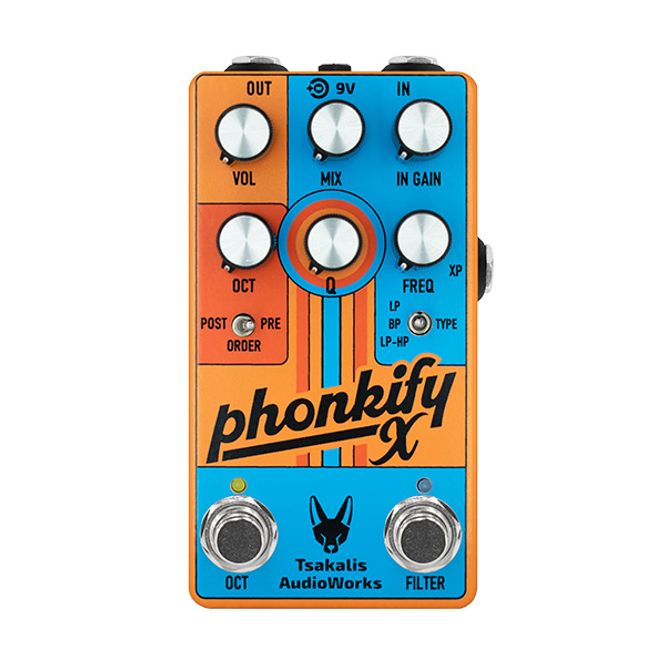
Tsakalis Audioworks Phonkify X Envelope Filter and Octave Maximise your funk with the Tsakalis Audioworks Phonkify X pedal. A potent pairing of fabulous filters and outstanding octaves. Expanding on the esteemed original Phonkify, the Phonkify X turns up the funk-o-meter with three selectable flavours of envelope filter and three types of octave voicings. This makes the pedal not only perfect for juicing up your jams and dripping your tone in cosmic gravy, but also delivers filters and octave tones that go way beyond and into the spaces between. Featuring flexible momentary or latching operation for each effect, plus a dedicated toggle switch for selecting the order of the filter and octave, the Phonkify X is ready to pour on the funk gravy and turn up the stank factor! Main Features: • Independent Filter and Octave effects pedal • Three distinct Filter modes - Low Pass, Band Pass and Combo-Blend • Optional control of Filter frequency range, via expression pedal • Octave up, Octave down or a blend of both • True Bypass • Internal voltage doubling, for increased headroom • Latching or momentary footswitch control • Handmade in Athens, Greece • Powered by (opt.) 9 V DC PSU (centre -, 2.1mm, ~ 120 mA current draw, not included) Phonkify X’s Filter section warps and wiggles your tone into a kaleidoscope of grooves. Flip the dedicated toggle switch to find your filter flavour: Low Pass for warm, buttery tones, Band Pass for that snappy, in-your-face attitude or a cosmic combo of Low Pass-to-High Pass for sweeping, interstellar effects. Got an expression pedal? Slide it in and ride the funk wave with hands-free control over your freaky frequencies. While the Octave section can make the floor rumble and shake! No matter if you’re feeling that high-flying octave-up, a deep-diving octave-down or a spaced-out blend of both, hit that footswitch and squeeze out every last funky drop.   Need more juice? Crank the master volume to fine-tune your output, while the pedal’s internal voltage doubling gives your tone headroom for days. True Bypass keeps your original signal pure when you step off the funk train. The Phonkify X isn’t just a pedal. It’s a total vibe machine, a groove generator and a tone tailor for the funky-hearted. Whether you’re laying down tight pocket grooves or blasting off into experimental soundscapes, the Phonkify X has the tools to elevate your sounds right into the stratosphere.
Source Audio ENCOUNTER Delay ...

4.790,-

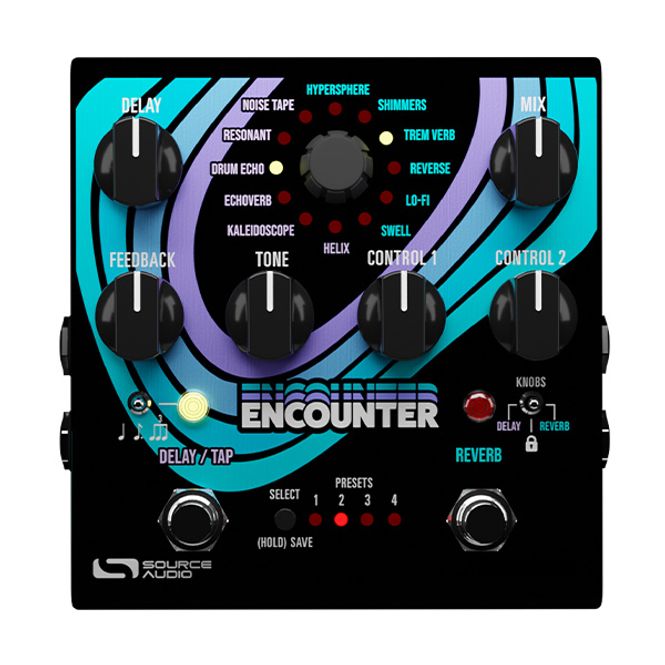
Source Audio Encounter Ambient Delay + Reverb Source Audio’s Encounter is more than just a delay and reverb pedal, it’s a gateway to atmospheric soundscapes. Based on the legendary Collider Delay + Reverb, Encounter sports a similar layout, while adding a wide-ranging collection of new and otherworldly delay and reverb effects.   Packing a mix of brand-new sounds and reimagined favourites from Source Audio’s range of delay and reverb pedals, Encounter is sure to conjure up a wealth of ambient sounds. Main Features • Stereo Ambient Delay and Reverb Effects Pedal • Analog Dry Through Path • 6 onboard Delay engines           o Noise Tape, Resonant, Drum Echo, Echoverb, Kaleidoscope and Helix • 6 onboard Reverb engines           o Hypersphere, Shimmers, TremVerb, Reverse, Lo-Fi and Swell • 8 Presets accessible via onboard controls and 128 presets available via MIDI • Mix knob - for adjusting between 100% Wet/Dry Balance plus global Kill-Dry Mode • Input with selector switch for selecting external control source (EXP/Switch) • Delay Footswitch doubles as a Tap Tempo control • Sub-Division control switch for the Delay (quarter note/dotted eighth note/triplets) • Stereo Inputs and Outputs • Mini USB Port for connecting to Neuro 3.0, Source Audio’s preset editing software • MIDI IN and MIDI THRU connections • 3.5 mm control port - for connecting compatible Source Audio control devices • Switchable True or Analog Buffered Bypass • Included 3.5 mm to 6.3 mm TRS cable to connect to mobile devices • Powered by (included) 9V DC power supply (centre -, 2,1 mm, ~280 mA current draw) All six delay and six reverb engines can be used individually or in pairs (that includes dual delay or dual reverb combinations) with full MIDI functionality and stereo ins & outs. Routing options include series, parallel, or split stereo. Each footswitch engages or disengages its own effect, essentially providing the functionality of two separate pedals in one unit. The new engines such as the Hypersphere reverb, Kaleidoscope delay, and Shimmers are among the most beautiful and imaginative in Source Audio’s history. Returning effects such as Reverse, Lo-Fi, and Swell reverbs, along with the Helix, Drum Echo, and Resonant delays, have been reimagined and enhanced with expanded parameter controls, unlocking limitless sonic possibilities and creative potential.
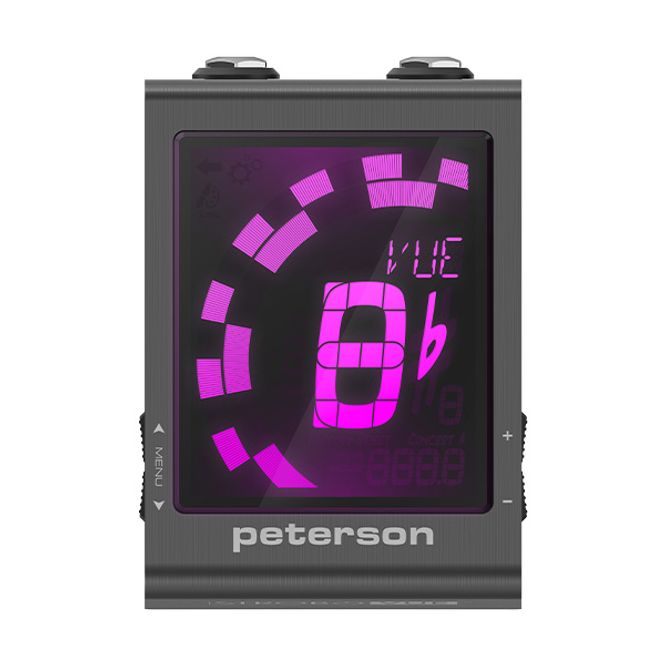
Peterson StroboVUE Always on ...

1.666,-

Peterson StroboVUE Viewable. Unmuted. Effortless Accurate to 0.1 cents, the Peterson StroboVUE is an Always-On, Un-mutable Pedalboard Tuning Monitor. StroboVUE features the same large, high-definition multi-colour display made famous by the StroboStomp HD, Pure Buffer output, top mounted connections (audio I/O, power, and USB-C), and over 100 Exclusive Sweetened Tunings™ and Guided tuning presets. The StroboVUE elevates your tuning experience with its High-Definition LCD screen and variable-colour LED backlight. User-selectable colours can be customised for personal preference or optimised for visibility in various ambient lighting conditions. Colours can also be assigned per preset, reducing menu navigation and providing greater efficiency while tuning on stage. StroboVUE also features an Always-On Buffered Output, designed to boost your instruments signal and prevent tone loss in signal chains containing low-impedance pedals or longer cable runs. Its buffered output mode preserves sonic quality across the entire instrument range, keeping your tone intact. Main Features: • Always on Tuning Monitor • True Strobe 0.1 Cent accuracy • Easily visible in direct sunlight or stage lighting • Pure Buffered Output • 130 Sweetened and Guided Tunings • Firmware updatable via USB-C • High-Definition LCD screen with a variable colour LED backlight • Selectable Drop/Capo settings -6 to +5 • Concert A range - 390 Hz to 490 Hz • Powered by 9V DC power supply (centre -, 2.1mm, ~ 85 mA current draw, not included) With over 100 exclusive Sweetened Tunings™ and numbered Guided Tuning presets, StroboVUE supports a wide variety of instruments and playing styles. Sweetened Tunings, exclusive to Peterson, are designed to correct inherent tuning issues found in many instruments. Guided Tunings display numeric string values instead of traditional note names, ensuring intuitive, accurate, and fast re-tuning for open and alternative tunings. These were created for both beginners exploring alternate tunings and experienced players who switch tunings frequently. Numerically expressed scales are also included.
Old Blood Noise Black ...

4.307,-

Black Fountain Stereo Characterful Delay Pedal Building on the inimitable Black Fountain, a pedal that put OBNE on the map and for many a favourite always-on device, Black Fountain Stereo is much more than just turning things from mono into stereo. It truly expands Old Blood Noise Endeavors' highly regarded ‘oil-can delay’ pedal right into a multi-tool. With a wider control set that’s complete with added sonic options, a lower noise floor, dual delay lines that play together in a multitude of ways, presets, MIDI and expression control over everything, Black Fountain Stereo combines a sonic powerhouse of creative delay tones and into a pedalboard friendly package. Main Features: Characterful ‘oil-can delay’ pedal Stereo input and output, with the option for Mono or Mono-in-Stereo-out routing Dedicated knobs to control Rate and Depth of modulation plus Tone and Grit of delay voicing Time and Subdivision controls for each delay line Additional controls for feedback, Wet/Dry Volume and Stereo Space Analog dry through Expression and MIDI control over all parameters MIDI clock I/O for external temp syncing Onboard Presets, plus control via MIDI Selectable Buffered Trails or True Bypass modes Top-mounted jacks and Soft-Touch Switching Hand-made in Oklahoma, USA Available in 3 Colourways - Cream (standard), Terracotta and Slate Powered by (opt.) 9 V DC PSU                (centre -, 2.1mm, ~ 350 mA current draw, not included) Black Fountain Stereo emulates the sound of a spinning oil-can delay. This is a warm, modulated and a little gritty type of tone that’s perfect for chorusing, doubling, slap back and long rhythmic delays alike. You choose the amount and rate of modulation, the tone and grit of the core voice, the two delay times and their feedback. Plus, to top it off the mono/stereo voicing of it all can be set exactly as you like and everything can be saved into presets, for easy recall. The Rate and Depth controls set the amount of modulation and speed, Tone shapes the warmth of the repeats, while Grit sets the amount of drive in the repeats. To help maintain the clarity of your tone or for more special effects, you can set the mix of volume of either the Dry and/or Wet levels. Space defines the mono delay mode or stereo width and adds diffusion past the noon position. Separate controls are available for setting the Left and Right Delay Time as well as being able to choose between six subdivisions for each side when holding the Tap footswitch. That little Tap switch (surprise) helps you set the delay repeats in time with your tempo, while holding it down will give for infinite feedback. Optionally, it can also be used as a preset switcher.
Viser 261 til 270 (av 3694 produkter)
  • vipps-orange.png
  • klarna-light.png
  • mastercard-full.png
  • visa.png