Hopp til innhold

Norsk nettbutikk | Rask levering | Frakt i hele Norge

Midi keyboard

 
Nektar Impact GXP49 USB MIDI ...

1.920,-

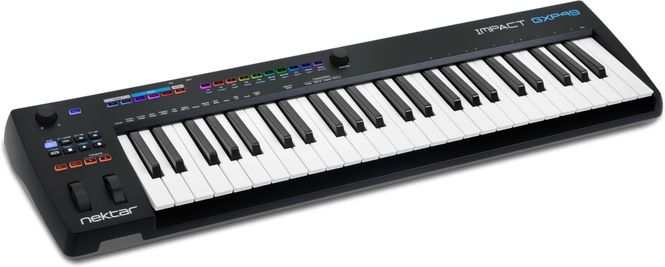
Nektar Impact GXP49 USB-klaviatur med 49 semiveide tangenter av høy kvalitet. Levereres med Steinberg Cubase LE (med Retrologue) og Cherry Audio Plugin Bundle som inneholder Mercury-6, PS-20, OctaveCat, DreamSynth og Starburst-201 Tape Echo samt Melodics og Nektarine. Nektar Impact GXP49 er ett USB-klaviatur med 49 stk semiveide tangenter og 14 stk LED-knappar for MIDI, note repeat og Nektarine-funksjoner. The new Impact GXP49 USB MIDI controller keyboard focusses on players and performers, featuring 49 semi-weighted keys, instant access to performance controls including a real-time repeat engine, powerful Nektarine plugin patch management and Nektar DAW Integration.   At the core of GXP49 is a newly designed and carefully balanced keyboard action. Its 49 semi-weighted full-size keys with velocity and aftertouch deliver a nice, firm touch and great playability. The GXP49 gives keyboard players all the right expression options needed for live and studio work, featuring pitch bend & modulation wheels, an expression pedal socket and a ¼" TRS jack for connection of 2 foot switch pedals. The rear panel also includes a 5-pin MIDI out jack and an external power supply socket for powering the unit when not connected via USB.   The streamlined no-fuss control panel is based on the successful Nektar Impact GX-series, enabling advanced DAW integration with extended transport control, track selection and volume control as well as options to open/close DAW windows and navigate songs. In addition, GXP49’s user interface also has 14 assignable illuminated RGB buttons for direct MIDI program- and bank-selection.   The new KEY REPEAT engine adds an intuitive real-time tool for creating inspiring rhythmic elements. Repeat is directly controllable from GXP’s illuminated RGB buttons: Once the Repeat mode is engaged, the buttons allow for direct selection of Repeat Rates, Accent, Interval, Swing and routing aftertouch or modulation to velocity. When Repeat is active, the second encoder turns into a dedicated tempo control, unless synchronization is set to external MIDI clock.   In combination with NEKTARINE, Impact GXP49 gets powerful master keyboard functionality: Up to 16 VST or AU instrument-plugins can be loaded into Nektarine’s 16 slots for simultaneous use. GXP49 brings instant patch recall to hybrid or software-based keyboard setups with direct patch control from GXP49’s RBG patch buttons and the ability to define keyboard zones, layers and splits for all hosted plugins. All plugin settings and combinations can be saved in a single Multi-patch for recall at the touch of a button. Nektarine can run as VST, AU or AAX plugin in any compatible DAW or be used as stand-alone application. IMPACT GXP49 works with any MIDI software on OSX, Windows and iOS and can also be used as a standard MIDI controller for external MIDI gear right out of the box.   IMPACT GXP 49, 61 & 88 -49, 61 or 88-note full-sized keybed with velocity and aftertouch -4 RGB LED buttons for MIDI, note repeat and Nektarine features -Pitch Bend and Modulation Wheels  -1 push encoder for note repeat tempo control and Nektarine features  -Octave up/down buttons with LED indicators  -Transpose up/down buttons with LED indicators. Assignable to other functions.  -Power on/off switch  -9v DC power supply socket (PSU optional)  -USB port and USB bus powered  -7 transport buttons for DAW integration or MIDI assignable  -Shift button activates secondary level for a total of 14 accessible buttons -1 MIDI assignable potentiometer -Note Repeat button with LED tempo indicator -Note Repeat Function button -1/4" TRS jack expression pedal socket (pedal not included) -1/4" TRS jack Foot Switch socket for connection of up to 2 standard foot switches (not included, dual mode requires optional Y-cable adapter) -MIDI Output jack -Nektar DAW integration support* -Nektarine plugin control and patch librarian software support* -Nektar DAW Integration for Impact GXP88 currently supports:  Bitwig, Cubase, Digital Performer, Garageband, Logic, Nuendo, Reaper, Reason, Sonar, Studio One
Nektar Impact LX Mini MIDI ...

1.190,-

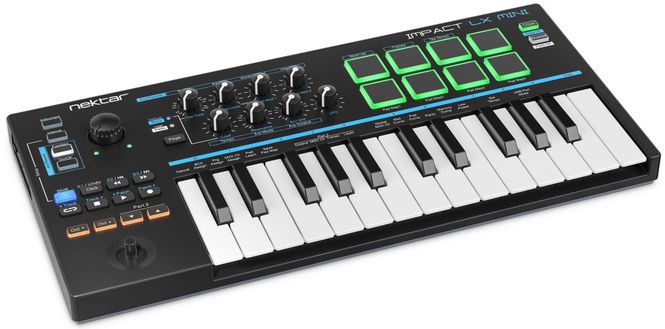
Nektar Impact LX Mini Impact LX Mini USB Midi-kontroller har alt man behøver for å spille, opptre og produsers hvor enn du befinner deg. Levereres med Bitwig Studio 8-Track og Cherry Audio Plugin Bundle som inneholder Mercury-6, PS-20, OctaveCat, DreamSynth og Starburst-201 Tape Echo. Kontroll av arpeggiatorparameter, plug-in innstillinger eller MIDI-styring er alltid bare ett knappetrykk unna. Dedikerte oktavknapper, komplett transport-del, 8 hyperfølsomme LED-trommepads og 8 potter pluss en stor volumknott gjør det gøy å bokstavlig talt ta kontroll. De fleste kontroller, inklusiv joystickens opp/ned funksjon, foot switch, pads, knotter og transportknapper er også MIDI-styrbare for enda flere alternativ. Impact LX Mini kommer med Bitwig 8-Track og Nektar DAW integrasjon for å la LX Mini kontrollere Ableton Live, Bitwig, Logic, Cubase, Reason m.fl. Impact LX Mini is an expressive mini-keybed with 25 velocity-sensitive keys, a joystick for pitch bend & modulation as well as a sustain pedal footswitch socket. Impact LX Mini is universally compatible with any MIDI music software on Mac OS, Windows, iOS (requires optional Apple camera kit) or Linux (with a MIDI extension).   LX Mini has been designed for real-time performance, with a top panel that delivers quick and easy access: Mode buttons ensure that controlling arpeggiator parameters, plugin settings or internal MIDI assignments are always just one button press away. Dedicated buttons for octave shift, Part 2, a full-featured transport section, 8 hyper-sensitive LED drum pads and 8 pots plus a large volume knob make it fun to literally take control. Most controls, including the joystick’s up/down axes, footswitch, pads, knobs and transport buttons are also MIDI-assignable for even more options.   LX Mini comes bundled with Bitwig 8-Track DAW software. This turns Impact LX Mini into a complete and very affordable entry-level solution. The also included ‘Bitwig Essentials’ content package, featuring hand-picked loops and samples as well as over 50 software instruments and effects, gets users going right away. DOUBLE UP: PART 2 Part 2 is a unique performance feature for momentary setup changes: While playing, press one of the dedicated "Part 2" buttons to momentarily shift the octave up or down, transpose, layer another octave on top, switch to another MIDI channel altogether – or any combination of these features. The instant you let go of the buttons, Impact LX Mini reverts back to its original settings. What’s more, any note that was played prior to pressing "Part 2" will keep playing at the original settings – so you could play and hold some really low bass notes, while playing a solo over the top. You’d like to latch your setting? Simply press the second Part 2 button while still holding the first. Part 2 will help you play in new ways, not even possible on larger keyboards!   FEATURES AND SPECIFICATIONS   -Works with any MIDI music software on Windows, OS X and iOS* as well as Linux (requires installation of JACK and ALSA) - 25 velocity-sensitive mini keys - 4 velocity curves (soft, default, hard 1, hard 2) and 3 fixed values - Joystick for pitch bend and 2 modulation controls (MIDI assignable) - Joystick features MIDI assignable push-button - Footswitch jack 1/8" (MIDI and Part 2 assignable, adapter to 1/4" jack included) - Octave up/down buttons with LED indicators - Part 2 up/down buttons with LED indicators: Assignable to momentary octave shift, transpose, layering MIDI notes and switching MIDI channel (Latch option also available) - Keyboard Transpose via Shift + Part 2 buttons - 8 velocity-sensitive LED Pads (4 pad maps) - 8 pots ( x2 via Page Button, functionality changes according to mode) - Volume pot with LED settings indication - 7 transport buttons for DAW integration or MIDI assignable - ‘Shift’ button activates secondary level for a total of 14 accessible button functions (+3rd level for another 7 functions with Nektar DAW integration) - Nektar DAW integration support - USB class compliant and USB powered (no driver required) - Dimensions & Weight: 39 cm (L) x 18,5 cm (D) x 3,8 cm (H), 1 kgs
Nektar Impact LX25+ MIDI ...

1.200,-

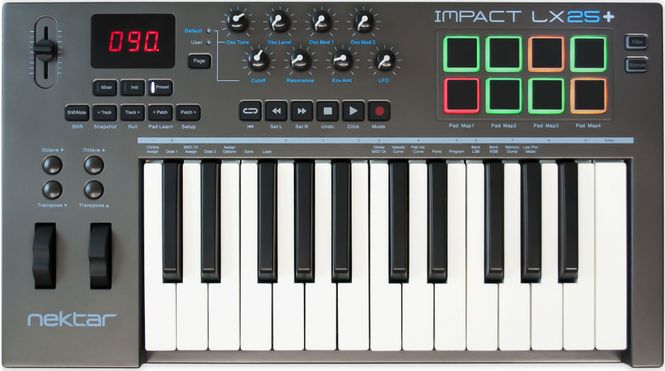
Impact LX25+ 25-tangenters USB-klaviatur med en fader, 8 potter, 8 trommepads og 6 transport-knapper. Kompatibelt med Bitwig, Cubase, Digital Performer, FL Studio, GarageBand, Logic, Nuendo, Reaper, Reason, Sonar og Studio One. Bitwig 8-Track følger med. Compact. Control. Creativity The Impact LX25+ MIDI controller is compact and portable yet jam-packed with intelligent and expressive performance control not even available on many premium products. Ever wanted a controller that hooks up automatically to your DAW? Impact LX25+ does exactly that. Nektar DAW Integration custom designed for Bitwig, Cubase, Digital Performer, FL Studio, GarageBand, Logic, Nuendo, Reaper, Reason, Sonar and Studio One takes Impact LX25+ way beyond functionality normally offered by a USB MIDI controller keyboard. With Impact LX25+ the hard work is done, so you can focus on your creativity. IMPACT LX25+ CONTROLLER KEYBOARD The 25 note velocity sensitive keyboard is a synth action with a medium tension. The full-size, piano-style keys are covered to protect against dirt and dust while also complementing the Impact LX design. With 4 velocity curves gradually increasing in dynamics there is a choice for any playing style. If you don't need velocity, 3 fixed velocity levels cater for a consistent output. Octave and transpose buttons as well as pitch bend and modulation wheels are within reach, so you can quickly shift the keyboard up or down as needed, or apply additional articulation with the wheels. OCTAVE & TRANSPOSE BUTTONS There is more to the 4 Octave & Transpose buttons than meets the eye. 4 functions are selectable on the fly so you can make important changes at any time, even while you play. A key combination makes assignment quick and easy. Choices include sending out MIDI Program Messages, change the Global MIDI Channel or select any of Impact LX25+'s 5 user presets with either the Octave or Transpose buttons. CONTROL CENTER  A 30mm fader and 8 pots are at the center of the Impact LX25+ control panel. Each control is fully programmable to send any MIDI CC message for use with hardware or software MIDI products. Used with Nektar DAW integration, the controls take on a life of their own, providing flexible pre-mapped DAW control giving you the best of both worlds. Control settings can be stored in any of the 5 Impact LX25+ presets for recall at any time. And if you switch Null on, any parameter values are stored when you change presets so you avoid parameter jumping. PADS  For groove and beat creation, Impact LX25+'s 8 velocity sensitive pads make life easy. Calibrated to trigger at a light touch, finger drumming is suddenly well within reach with a nice and even velocity response. Each pad can be assigned any MIDI note number or MIDI cc message for use as MIDI trigger or toggle buttons. But the best part is the "Pad Learn“ feature, which allows you to just select a pad, play the note or drum sound you want on the keyboard and assignment is done. No complex menus for a task that's essential to getting the most out of your pads. Assignments are stored over power cycling so you don't lose your settings when you switch your system off for the night. In addition, 4 pad map locations can store your settings for future recall. The 4 color LED illumination not only looks good but also indicate which pad map is currently loaded and can even tell you which type of MIDI message each pad sends. With Nektar DAW Integration, the pads are automatically mapped in for example Reason and Bitwig.. The two Clips and Scenes buttons are used in Bitwig  to trigger...., Clips and Scenes. In Reason, a clever control of Reason's location points create a similar experience with scenes triggering of any Reason song. NEKTAR DAW INTEGRATION Impact LX25+ software integration supports most of the popular DAWs. A common workflow gives access to many of the functions you are most likely to need when recording and performing with your Impact LX25+. The best part is that it's all done for you: Simply complete the installation process and start making music! Impact LX25+ DAW integration currently supports Cubase, Digital Performer, FL Studio, Garageband, Logic, Nuendo, Reaper, Reason, Sonar and Studio One. Buttons and controls are labeled so you don't have to remember how they are assigned. That’s why Impact LX25+ is a breeze to use but with enough extra features under the hood to challenge even the most experienced power user.   Tangenter: 25 Anslagsfølsom: Ja Aftertouch: Nei Fader: 1 st Potter: 8 st Transportknapper: 6 Trommepads: 8 Operativsystem: Mac, Win, Linux Mål: 477 x 267 x 70 mm Vekt: 1,82 kg   Link: Nektars produktsida  
Nektar NP-2 Sustain Pedal ...

355,-

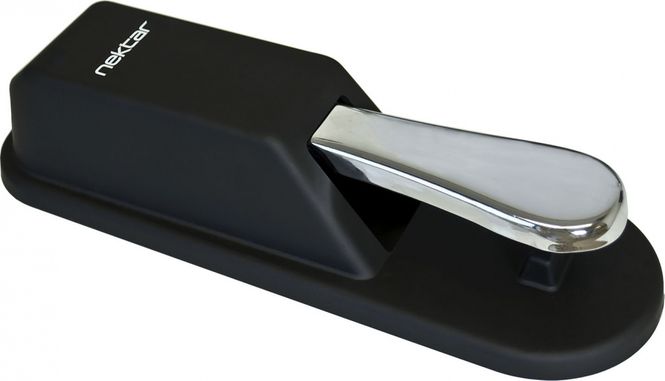
Nektar NP-2 Universal piano style keyboard sustain foot switch pedal Solid metal pedal and base with rubberized cover Rubber foot plate for solid floor grip Polarity switch - works with all keyboards 1,8m cable with 1/4" TS jack plug Weight: 726 g Put Your Foot On It The Nektar NX-P expression pedal and NP-1 / NP-2 universal foot switch pedals are solid, rugged and ideal for both studio and stage. Rubber gripping keeps them in place during performances and polarity switching ensures they work with almost any keyboard or electronic product, requiring a foot switch or expression pedal.  
Nektar Pacer MIDI DAW ...

2.500,-

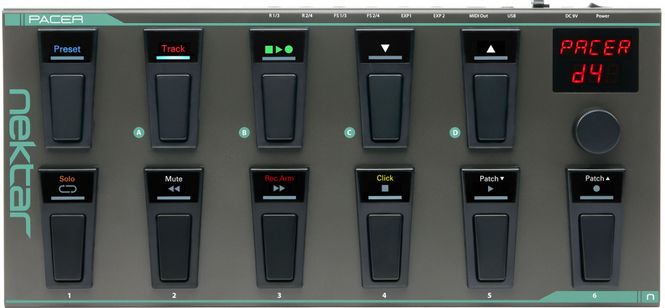
Pacer MIDI DAW fotkontroller med 10st programmerbara fotomkopplare, LED-display, 2st expressionpedalingångar, 2st ingångar för ytterligare fotomkopplare och 2st relay-ingångar. MIDI presets medföljer för extern hårdvara som Line6 Helix, Avid Eleven Rack, Kemper Profiler, H&K GrandMeister m.fl. _____ PACER - Hands-free DAW and MIDI Control PACER boosts your creativity by providing hands-free control of your DAW, MIDI guitar soft- or hardware as well as channel- and FX-switching on your trusted analog amp. All integrated into one rugged and stage-ready foot pedal with 10 programmable LED foot switches, 4 switching relays and connections for up to 4 external foot switches and 2 expression pedals. That's a lot of switching power right at your feet: With just one press of a button, you can send up to 16 MIDI and relay messages to reconfigure a setup instantly. Step up your pace with this powerful MIDI DAW Footswitch Controller!   THE POWER OF SWITCHES Pacer's programming options are extensive. In the most basic state, a switch can send a MIDI message or change a relay state. But being able to send MIDI messages in a sequence of steps, takes the usefulness of a preset to another level. Use one switch to step through program change messages during your song and the other switches are free for FX on/off control. Or switch your amp channel, start playback in your DAW and change program on your effects rack, all by just pressing ONE button within the same preset. Another 16 MIDI messages/relay settings can be programmed for triggering when each of the 24 presets are selected.   Whether you are looking for a simple pre-configured solution to control products such as Line 6, Kemper Profiler, AxeFX and Avid Eleven, want to control your DAW without letting go of your instrument or plan to create your own advanced setups for controlling a live show, PACER does it all.   DAW CONTROL OPTIONS Don't stop the music: PACER is the only true hands-free solution for controlling a DAW and features a complete set of dedicated track and transport controls. For MCU (Mackie Control Universal) compatible DAWs, a Transport preset provides control over Cycle/Loop, Rewind, Forward, Stop, Play and Record. Each switch has its own large icon illuminated by an RGB LED to show the current status. The Track preset controls Solo, Mute, Record Arm and Click. Almost every DAW is compatible with MCU including Ableton Live, FL Studio, Pro Tools or Sonar.   Nektar DAW integration provides the highest level of integration with additional options for track and patch selection, customized RGB LED color feedback and in some cases additional functionality. Nektar DAW integration supports Bitwig, Cubase, GarageBand, Logic, Nuendo, Reason, Reaper and Studio One.   CONTROL CENTER PACER has 10 programmable foot switch controls, each equipped with an RGB LED. Add to that a crisp and large two row LED display, a dedicated switch for Preset recall and an encoder with push switch for programming, navigation and control. So PACER definitely won't leave you in the dark, figuratively speaking: Depending on the active mode, the top or middle row icons are illuminated. The RGB LEDs in the bottom row display switch status.   DISPLAY AND LEDS A red LED display with two rows shows the active preset name/number, mode and selected parameter and value. The data encoder with push switching right next to it makes parameter selection and programming swift and easy. Each switch has its own 3-row RGB activity LED: With functions like "Click" screened in the top row, transport icons in the center and an activity LED at the bottom. LED setting and color are part of a preset and customizable.   SWITCHES A-D These switches are fully programmable, but factory assigned with these presets: A: Track preset (for DAW control) B: Transport preset (for DAW control) C: Load previous preset D: Load next preset You can reconfigure the switches to send any other function or MIDI message.   SWITCHES 1-6 You can program the switches to send MIDI messages, control one of PACER's 4 relays or to load presets. When DAW Transport or Track functions are assigned, the top and middle row icons are illuminated by default. Worth mentioning is, that each switch can change up to 6 actions simultaneously or in a sequence of presses. That's a lot of switching power right there!   PRESET SWITCH PACER has 24 presets. Any switch can be programmed to select a preset, but pressing and holding "Preset" and then selecting a bank & number is available at any time.   As mentioned above, each control within a preset is programmable with up to 6 steps or actions. What's more, these steps can be sent simultaneously or in a sequence of presses. When you load a preset, up to 16 MIDI-messages or switch states can be sent at the same time: Just one stomp can have a dramatic effect!  
Nektar Panorama P4 Controller ...

5.590,-

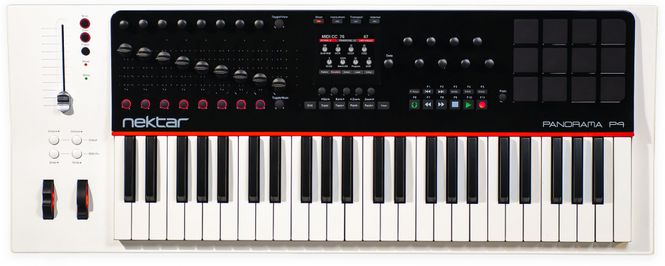
Panorama P4 and P6 are incredible keyboard controller instruments with the most intuitive workflow, you have ever seen. Spectacular and deep integration with Bitwig Studio, Cubase, Logic Pro, MainStage, Reaper and Reason puts the spotlight on performance and creativity. Keyboard and pads are dynamic, sensitive and balanced carefully with a solid feel that allows for complete expression. All this, combined with 93 real-time controls available at any one time, makes Panorama the definitive keyboard controller for Bitwig Studio, Cubase, Logic Pro & Reason. KEYBOARD BALANCED TO PERFECTION Panorama's keyboard action uses weights to offset the otherwise increasing tension you would experience from the spring. This means the down movement is as clean as possible and not heavy or fatiguing to play. We keep the down weight required within the heavy end of common standards for acoustic pianos. In addition, the dynamic range is much wider than what you experience on most controller keyboards allowing better control of both low and high velocity values. 5 velocity curves gives you choice just in case your playing style requires a different feel. Monophonic aftertouch, pitch bend and modulation wheels, plus foot switch and expression pedal jacks set you up for performance. THE DISPLAY SAYS IT ALL A crystal clear 3.5" color TFT display delivers the information you really need, for each mode or menu. Regardless of whether you are operating Reason or programming MIDI assignments in Internal mode, the display provides detailed information that makes your workflow fluent and fast. Panorama takes the hard work out of using a controller and makes operations that seem complicated and non-transparent on other products, straight-forward and simple. MORE CONTROLS THAN EVER BEFORE An unrivaled amount of assignable controls makes Panorama the most comprehensive and fully featured MIDI controller keyboard around. 16 encoders, 9 45mm faders, 1 100mm motorized ALPS fader, 10 LED buttons, 28 buttons, 12 pads each with strike and pressure component, foot switch jack, expression pedal jack, keyboard after touch, pitch bend and modulation wheels gives you immediate control of up to 93 parameters at any one time. You can store settings in 20 presets with individually save and loadable keyboard, pad and F-keys maps. We could argue that it gives you access to over 1500 assigned controls, but that would be spinning it too far. MIDI CONTROL - A GAME OF MANY OPTIONS! Setting up presets or F-keys maps is easy on Panorama. The Control Edit menu enables you to quickly select a control and in real-time assign the MIDI command you want. For each control values can be scaled, reverse and assigned specific or global MIDI channels. Here is a chart showing the programming options available for each type of control: PRO-CONSOLE CONTROL WITHIN REACH The motorized 100mm touch-sensitive ALPS fader gives you pro-console mixer channel control when operated with Bitwig, Cubase, Logic, Nuendo, Reaper or Reason. Watch the fader move when you change tracks and just move it to change volume. Two LED buttons controls Solo and Mute so no matter what mode you operating Panorama in, you always have pro-console control within reach. TRANSPORT WHEN YOU NEED IT, FUNCTION BUTTONS WHEN YOU DON'T It's hard to go places without transport so Panorama features an extended 11 button transport bar, positions right where you need it controlling: Return to L, Forward to R, Undo, Click on/off, Record Mode, Cycle on/off, Back, Forward, Stop, Play and Record. Using the shift button, these also double up as 11 function buttons each assignable to MIDI commands or QWERTY macro's. SHORTCUT TO SOFTWARE FUNCTIONS* So QWERTY macro's...... big deal, right? That's right, its a VERY big deal. Your software has a ton of features and functions that can be activated using QWERTY shortcut commands. Assigning a command to a button so you don't have to be near your computer makes life a lot easier. Assigning a string of up to 8 commands takes it to another level. With this powerful feature you could for example enter edit mode, zoom in and select a tool with just one button press. Or create an instrument or effects track and locate a folder containing your presets so you can select them from Panorama, all with one button press and without looking at your computer. *QWERTY macro's are not available in OS X 10.11 or higher CONTROLLING BITWIG STUDIO, CUBASE, NUENDO, LOGIC PRO, MAINSTAGE, REAPER OR REASON HAS NEVER FELT SO REAL For Bitwig Studio, Cubase, Nuendo, Logic Pro, Reaper and Reason users, Panorama is a dream come true. The dedicated communication protocol ties Panorama and your DAW tightly together so all you have to do is select the mode and menu you want to control. Panorama does the rest. Three modes allows you one button press to switch between controlling the Mixer, Instruments and Transport, with the 4th mode, Internal, still providing access to traditional MIDI control. The integration with Bitwig Studio, Cubase, Nuendo, Logic Pro, MainStage, Reaper and Reason is so deep that you can immerse yourself in your music without having to constantly reach for the mouse. Panorama gives you the creative freedom to just focus on your music. YOUR REWIRE SLAVE AND HOST CONTROLLED IN ABSOLUTE REAL-TIME Reason ReWired to Cubase, Nuendo, Logic Pro or Reaper is a whole new experience with Panorama. Select which DAW you want to control straight from Panorama, in absolute real-time and regardless of what's in focus on your computer. Color coding clearly tells you which environment you are controlling so you don't get confused as you switch back and forth. And better still, there really is not functionality lost when you change from controlling one DAW to the other. You of course could buy 2 Panorama products to achieve the same result but with Panorama you don't have to. The choice is yours. PADS WITH PRESSURE Playing drums or percussive parts on a keyboard can be a challenge, but luckily on Panorama you don't have to. 12 velocity and pressure-sensitive pads with choice of 7 velocity curves will inspire you to play in ways you would never do on the keyboard. The pads are unbelievably easy to program using the “Learn Note” function. Press a pad, press a key...it's that easy. The “Velocity Spread” feature quickly spreads one note across all 12 pads, each with its own fixed velocity, making it easier to create consistent and nuanced dynamics. The “Scale-Function” assigns each pad to pitches within any of the pre-defined 30+ scales. It's a quick and easy way to completely change pad assignments while freely changing intervals or transposing the whole set on the fly. Great for percussive performances with any keyboard sound as well as percussion. Reason devices such as ReDrum, Dr. Octo Rex and Kong are of course automatically assigned to pads in Panorama P4's Instrument mode with an additional 4 virtual pads available, when needed. PORTS & CONNECTIONS On the back of Panorama you find the connection points you need for foot controls, power and data including: - USB Micro B for external power supply or additional power for the motorized fader (cable included) - USB port for power and data connection to your computer - 5-pin MIDI din output port sending data either directly from the unit or from your DAW (working like a MIDI interface) - Foot switch jack, assignable (pedal not included) - Expression pedal jack, assignable (pedal not included) - On/off switch Informasjon: Tangenter 49 stk Anslagsfølsom Ja Aftertouch Ja Fadere 10 st Knotter 16 st Transportknapper 11 st Trommepads 12 st Operativsys. Mac, Win, Linux Mål 845 x 331 x 96 mm Vekt 6,36 kg  
Nektar Panorama P6 Controller ...

7.690,-

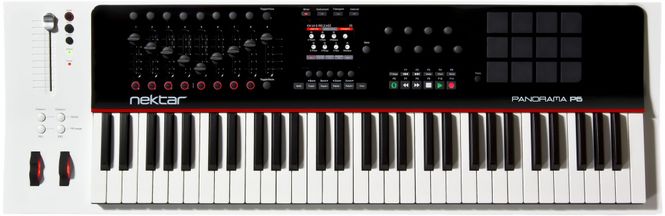
Panorama P4 and P6 are incredible keyboard controller instruments with the most intuitive workflow, you have ever seen. Spectacular and deep integration with Bitwig Studio, Cubase, Logic Pro, MainStage, Reaper and Reason puts the spotlight on performance and creativity. Keyboard and pads are dynamic, sensitive and balanced carefully with a solid feel that allows for complete expression. All this, combined with 93 real-time controls available at any one time, makes Panorama the definitive keyboard controller for Bitwig Studio, Cubase, Logic Pro & Reason. KEYBOARD BALANCED TO PERFECTION Panorama's keyboard action uses weights to offset the otherwise increasing tension you would experience from the spring. This means the down movement is as clean as possible and not heavy or fatiguing to play. We keep the down weight required within the heavy end of common standards for acoustic pianos. In addition, the dynamic range is much wider than what you experience on most controller keyboards allowing better control of both low and high velocity values. 5 velocity curves gives you choice just in case your playing style requires a different feel. Monophonic aftertouch, pitch bend and modulation wheels, plus foot switch and expression pedal jacks set you up for performance. THE DISPLAY SAYS IT ALL A crystal clear 3.5" color TFT display delivers the information you really need, for each mode or menu. Regardless of whether you are operating Reason or programming MIDI assignments in Internal mode, the display provides detailed information that makes your workflow fluent and fast. Panorama takes the hard work out of using a controller and makes operations that seem complicated and non-transparent on other products, straight-forward and simple. MORE CONTROLS THAN EVER BEFORE An unrivaled amount of assignable controls makes Panorama the most comprehensive and fully featured MIDI controller keyboard around. 16 encoders, 9 45mm faders, 1 100mm motorized ALPS fader, 10 LED buttons, 28 buttons, 12 pads each with strike and pressure component, foot switch jack, expression pedal jack, keyboard after touch, pitch bend and modulation wheels gives you immediate control of up to 93 parameters at any one time. You can store settings in 20 presets with individually save and loadable keyboard, pad and F-keys maps. We could argue that it gives you access to over 1500 assigned controls, but that would be spinning it too far. MIDI CONTROL - A GAME OF MANY OPTIONS! Setting up presets or F-keys maps is easy on Panorama. The Control Edit menu enables you to quickly select a control and in real-time assign the MIDI command you want. For each control values can be scaled, reverse and assigned specific or global MIDI channels. Here is a chart showing the programming options available for each type of control: PRO-CONSOLE CONTROL WITHIN REACH The motorized 100mm touch-sensitive ALPS fader gives you pro-console mixer channel control when operated with Bitwig, Cubase, Logic, Nuendo, Reaper or Reason. Watch the fader move when you change tracks and just move it to change volume. Two LED buttons controls Solo and Mute so no matter what mode you operating Panorama in, you always have pro-console control within reach. TRANSPORT WHEN YOU NEED IT, FUNCTION BUTTONS WHEN YOU DON'T It's hard to go places without transport so Panorama features an extended 11 button transport bar, positions right where you need it controlling: Return to L, Forward to R, Undo, Click on/off, Record Mode, Cycle on/off, Back, Forward, Stop, Play and Record. Using the shift button, these also double up as 11 function buttons each assignable to MIDI commands or QWERTY macro's. SHORTCUT TO SOFTWARE FUNCTIONS* So QWERTY macro's...... big deal, right? That's right, its a VERY big deal. Your software has a ton of features and functions that can be activated using QWERTY shortcut commands. Assigning a command to a button so you don't have to be near your computer makes life a lot easier. Assigning a string of up to 8 commands takes it to another level. With this powerful feature you could for example enter edit mode, zoom in and select a tool with just one button press. Or create an instrument or effects track and locate a folder containing your presets so you can select them from Panorama, all with one button press and without looking at your computer. *QWERTY macro's are not available in OS X 10.11 or higher CONTROLLING BITWIG STUDIO, CUBASE, NUENDO, LOGIC PRO, MAINSTAGE, REAPER OR REASON HAS NEVER FELT SO REAL For Bitwig Studio, Cubase, Nuendo, Logic Pro, Reaper and Reason users, Panorama is a dream come true. The dedicated communication protocol ties Panorama and your DAW tightly together so all you have to do is select the mode and menu you want to control. Panorama does the rest. Three modes allows you one button press to switch between controlling the Mixer, Instruments and Transport, with the 4th mode, Internal, still providing access to traditional MIDI control. The integration with Bitwig Studio, Cubase, Nuendo, Logic Pro, MainStage, Reaper and Reason is so deep that you can immerse yourself in your music without having to constantly reach for the mouse. Panorama gives you the creative freedom to just focus on your music. YOUR REWIRE SLAVE AND HOST CONTROLLED IN ABSOLUTE REAL-TIME Reason ReWired to Cubase, Nuendo, Logic Pro or Reaper is a whole new experience with Panorama. Select which DAW you want to control straight from Panorama, in absolute real-time and regardless of what's in focus on your computer. Color coding clearly tells you which environment you are controlling so you don't get confused as you switch back and forth. And better still, there really is not functionality lost when you change from controlling one DAW to the other. You of course could buy 2 Panorama products to achieve the same result but with Panorama you don't have to. The choice is yours. PADS WITH PRESSURE Playing drums or percussive parts on a keyboard can be a challenge, but luckily on Panorama you don't have to. 12 velocity and pressure-sensitive pads with choice of 7 velocity curves will inspire you to play in ways you would never do on the keyboard. The pads are unbelievably easy to program using the “Learn Note” function. Press a pad, press a key...it's that easy. The “Velocity Spread” feature quickly spreads one note across all 12 pads, each with its own fixed velocity, making it easier to create consistent and nuanced dynamics. The “Scale-Function” assigns each pad to pitches within any of the pre-defined 30+ scales. It's a quick and easy way to completely change pad assignments while freely changing intervals or transposing the whole set on the fly. Great for percussive performances with any keyboard sound as well as percussion. Reason devices such as ReDrum, Dr. Octo Rex and Kong are of course automatically assigned to pads in Panorama P4's Instrument mode with an additional 4 virtual pads available, when needed. PORTS & CONNECTIONS On the back of Panorama you find the connection points you need for foot controls, power and data including: - USB Micro B for external power supply or additional power for the motorized fader (cable included) - USB port for power and data connection to your computer - 5-pin MIDI din output port sending data either directly from the unit or from your DAW (working like a MIDI interface) - Foot switch jack, assignable (pedal not included) - Expression pedal jack, assignable (pedal not included) - On/off switch Informasjon: Tangenter 61 stk Anslagsfølsom Ja Aftertouch Ja Fadere 10 st Knotter 16 st Transportknapper 11 st Trommepads 12 st Operativsys. Mac, Win, Linux Mål 1007 x 331 x 96 mm Vekt 7,8 kg  
Nektar Panorama T4 Controller ...

3.120,-

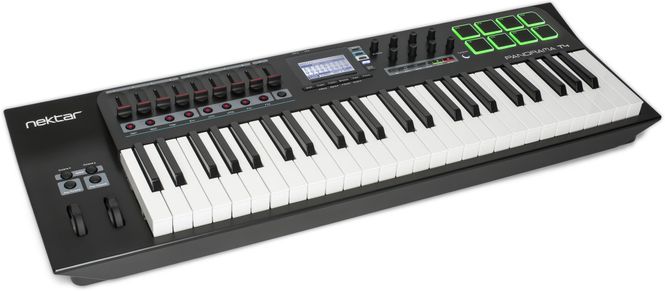
Nektar Panorama T4 Panorama T4 er ett 49-tangenters USB-klaviatur med LCD-display, 9 stk fadere, 8 stk programerbare encoders, 8 stk programerbare LED-knapper, 6 stk transport-knapper og 8 stk trommepads. Kompatibel med Bitwig, Cubase, GarageBand, Logic, Nuendo, Reason og Reaper. Bitwig 8-Track medfølger. Nektars første keyboard med Nektarine som gjør T4 ferdigmappet for en mengde DAWs og plug-ins. DEEP INSTRUMENT CONTROL IN ANY DAW WITH VST/AU SUPPORT Panorama T4 & T6 are the first controllers to deliver Nektar-level instrument plugin control in any VST/AU compatible DAW. Load patches directly from the keyboard and start controlling parameters immediately, with every change instantly visible on the LED display. Control any instrument plugin with one of the many included maps or customize and create your own. Discover new performance tools like the powerful chord, hold and note repeat functions. Tweak repeat parameters, plugin parameters and record it all in your DAW. Panorama T4 & T6 connect to most DAWs delivering track navigation, mixer and transport control with either Nektar DAW integration or MCU compatibility. Experience the unsurpassed integration of  Panorama T4 and T6! KEYS & PADS - 49 or 61 note 2nd Gen synth-action keyboard with aftertouch. - Expression & pedal sockets. - 8 super-sensitive pads with pressure. - Chord: Trigger up to 6 notes from one key or pad. - Hold: Holds played notes until deactivated - great with legato.   NOTE REPEAT - Inspiring performance tool - Real-time control of trigger rate, accent, swing and gate. - Separate settings for keys and pads. - Switch on/off at any time with dedicated repeat buttons. - Sync to external clock. - Control velocity with pressure or wheels   NEKTARINE - Loads in any VST/VST3/AU host DAW for instant access to Nektar plugin control. - Customize mapping or create plugin maps from scratch. - Browse patches directly from Panorama T4/T6 - Layer up to 8 VST/VST3/AU plugins with Panorama mix control of volume, pan, mute, solo and select.   DAW CONTROL - Nektar DAW integration for Bitwig, Cubase, GarageBand, Logic, Nuendo, Reason and Reaper. - MCU compatible for control of almost any other VST/AU DAW.   WHERE IS NEKTARINE? You hardly notice it, but it's there. Nektarine is discreet and doesn't impose itself on you or your DAW. But behind it lies a powerhouse of features that enhance control and library management of instrument plugins.   Launch Nektarine and it will immediately communicate with your Panorama T4/T6. Now you are ready to take deep control of VST, VST3 or AU plugins from Panorama: Load an instrument plugin that's supported by Nektarine's default plugin maps and create new and exciting sounds that you didn't even know your plugin was capable of. Turning knobs is so much more fun than mousing around. The display will tell you which parameter is assigned to each control as well as status feedback.   The LED buttons below the faders are set up for navigation so it's quick and easy to find your way around even complex plugins.  Each button is labeled with a common control page name such as OSC, Filter, Env, LFO and FX. As soon as you press a button, the corresponding Nektarine factory map page is selected. The LED buttons can be "learned" to any map page so you can set up each map exactly how you want it.   NEKTAR DAW INTEGRATION - THE COMPLETE SYSTEM Nektarine and MCU DAW control create a powerful system. Our Nektar DAW Integration software takes the system integration even further: This custom software is especially created for each of the supported DAWs and will provide you with a common workflow that gives access to expanded transport and mixer functions as well as control of your DAW's own instruments. It's the most complete DAW control system available, even compared with products in higher price brackets. Panorama T-series' DAW integration currently supports Bitwig, Cubase, Garageband, Logic, Nuendo, Reaper and Reason.   HIGHLIGHTS - Extended transport control with Goto Left locator, Set L and Set R locators, Undo, Click and Record Arm. - Mixer mode with display feedback, track listing, volume, pan and sends control. - Control of Smart/Quick Control in Logic and Cubase/Nuendo. - Dedicated maps for DAW's own included instruments - Basic mapping of plugins not hosted in Nektarine, offering 2 encoder pages and one fader control page. - Grab/learn parameters - take control of any parameter on the active instrument immediately. - Automatically detects and manages communication with Nektarine when inserted on a track. - Automation write/read activation.
Nektar SE25 Mini MIDI ...

475,-

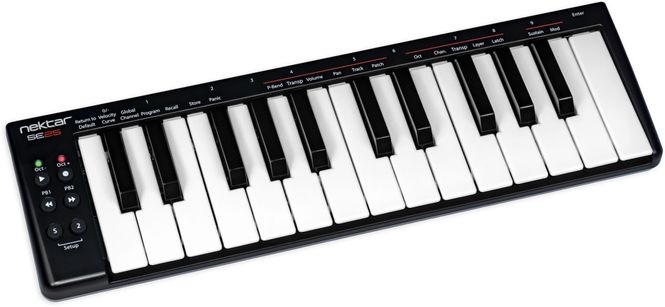
Nektar SE25 25-minitangenters USB-klaviatur med 6 knapper Perfekt løsning for ditt mobile studio. Nektars mest kompakte USB-keyboard er omtrent like bred som en laptop og gir deg alt du behøver for å skape musikk på reisefot: 25 stk anslagsfølsomme minitangenter av bra kvalitet og 6 knapprr med ulike funksjoner, blandt annet for å styre din DAW. En spennande funksjon er "knapp-2". Holder du den nedtrykt så kan du styre oktav, MIDI-kanal, transponering, lager eller latch eller en kombinasjon av disse. Så fort du slepper knappen så går den tillbake till originalinnstillingen. Bitwig 8-Track medfølger. Fungerar også med Apple iOS sammen med Camera Connection Kit. SMALL IS BEAUTIFUL: ULTIMATE MOBILITY The Nektar SE25 is a great solution for any mobile production setup. Our most compact MIDI keyboard controller is about as wide as a laptop and gives you all you need to create music on the move: 25 mini keys (that actually play well), six control buttons and Nektar DAW Integration. So the SE25 is way more powerful than it might seem at first glance. And we haven’t even mentioned our unique Part 2 feature yet…   MOBILE ACTION – THE KEYBOARD The keys are the most important feature for a MIDI controller keyboard: They transport your playing and musical ideas into the computer. As the SE25 is designed to be ultimately mobile and fit in any backpack, there was simply no room to fit full-size keys. But still we wanted it to be playable well. So we developed a new velocity-sensitive mini-keybed for the SE25. Despite these keys’ miniscule dimensions, you can play them expressively with a defined and firm feel. What’s more, a choice of three different velocity curves allows you to adjust the keyboard response to your playing style. These keys are ready for action!   DOUBLE UP – PART TWO Simply press  the dedicated “2” button to momentarily shift the octave, add an octave or harmony layer while you play – or switch to a different channel: The unique Part Two feature will enable you to play in ways not even possible on keyboards with many more keys! What’s so special about this? Well, the moment you let go of the Part Two button, the SE25 reverts back to its original settings. So you can toggle back-and-forth between two different keyboard configurations in realtime. A fun performance feature!   The “2” button is assignable to Octave, MIDI Channel, Transpose, Layer and Latch or a combination of these features.   MODULATE – PERFORMANCE CONTROLS Pitch Bend, Modulation and Sustain are key ingredients for dynamic keyboard performances. So we found a way to shrink the controls to size and put them right at your fingertips. Six buttons to the left of the keyboard are pre-assigned to octave shift, transpose and sustain. Don’t need transpose? Then assign the transpose buttons to Pitch Bend, MIDI Volume, Pan, Track* or Patch* change instead (*= requires Nektar DAW Integration). And the “S” Sustain button can alternatively be used to control modulation.    NEKTAR DAW INTEGRATION| Give your trackpad or mouse a break and control DAW transport functions and track selection directly from the SE25: Simply press the Play and Rewind buttons simultaneously to enter transport mode and our custom NEKTAR DAW Integration software lets you control your DAW! Nektar DAW Integration for SE25 surrently supports Bitwig, Cubase, Garageband, Logic, Nuendo, Digital Performer, Mixcraft, Reason, Reaper, Sonar and Studio One. (In order to take advantage of Nektar DAW Integration, you need to register your SE25 and download the integration files from your user account.)   CAPTURE YOUR IDEAS – BITWIG 8-TRACK INCLUDED You can start producing, performing, and designing sounds like a pro from day one with the included Bitwig 8-Track DAW. It includes over 50 software instruments and effects for use on up to 8 audio or MIDI project tracks, and you can use any 3rd party VST plug-ins you might own, too. The ‘Bitwig Essentials Package’ comes as part of this package as well, featuring a highly versatile handpicked selection of loops, clips and samples, to make it even easier to get you started. With Nektar DAW Integration you can control track selection and transport controls directly from the SE25, making this a fantastic combination. If you are just starting out, you will find it’s the perfect way to take your first steps in the world of digital music creation. And if you’re already familiar with using computer software, you’ll be amazed at what this combination has to offer! SPECIFICATIONS: - 25 velocity-sensitive mini keys - 3 velocity curves (default, soft, hard) - 6 buttons: Octave Up/Down, PB1/PB2, Sustain, Part 2 - PB1 & PB2 buttons (assignable to: Pitch Bend, Transpose, Vol, Pan, Track* or Patch* change) - Part Two button: Assignable to Octave, MIDI Channel, Transpose, Layer and Latch (momentary) - “S” button: Assignable to Sustain or Modulation - Transport control via secondary button function* - Works with any DAW or MIDI music software on OS X, Windows and Apple iOS. - Connections: Micro USB port (USB-powered) - Weight & Dimensions: 33.5 cm (L) x 10 cm (D) x 2.1 cm (H), 0.4 kgs (*= requires Nektar DAW Integration) IN THE BOX: - SE25 MIDI keyboard controller - Micro USB cable - User Guide - Bitwig licence card
  • vipps-orange.png
  • klarna-light.png
  • mastercard-full.png
  • visa.png